Have you ever felt this way:
your ideas are racing, but your fingers can’t keep up?
I was stuck in that state for a long time—until I decided to practice touch typing. And it turned out to be one of the most “life-worth learning” skills I’ve ever invested in.
This article is my real story:
no natural talent, no iron discipline—just a simple desire to work faster, think more clearly. And I did it. And honestly, anyone can do it too.
Touch typing
Touch typing is a technique that uses all ten fingers to type without looking at the keyboard, relying on muscle memory.
When you can touch type:
- Your typing speed increases noticeably
- Your hands get less tired, and wrist pain is reduced
- Your writing flows without breaking your train of thought
- You focus on the content, not the keyboard
- Your productivity improves day by day
This is a classic, long-lasting skill—the longer you use it, the more it pays off.
My journey: from “hunt-and-peck” to 100 WPM
I started practicing touch typing on my free days.
No pressure, no KPIs—just practicing like playing a game.
On free days, I practiced for 2–3 hours; on busy days, I took a break.
And what surprised me the most was this: hands have muscle memory, and they learn much faster than I ever expected.
After about two weeks, I was able to touch type without looking at the keyboard.
My speed at that point was around 65 WPM, but the feeling was completely different:
- Lighter keystrokes
- No broken train of thought
- Typing faster than my thinking speed
I started using touch typing right away for both work and study.
Up to now, I’ve naturally reached 100 WPM—without forcing it.
Mistakes that keep you from typing fast
Looking at the keyboard while typing
This is the number one reason you’ll never be able to type fast.
How to fix it: train yourself to keep your hands in the correct ten-finger position while typing.
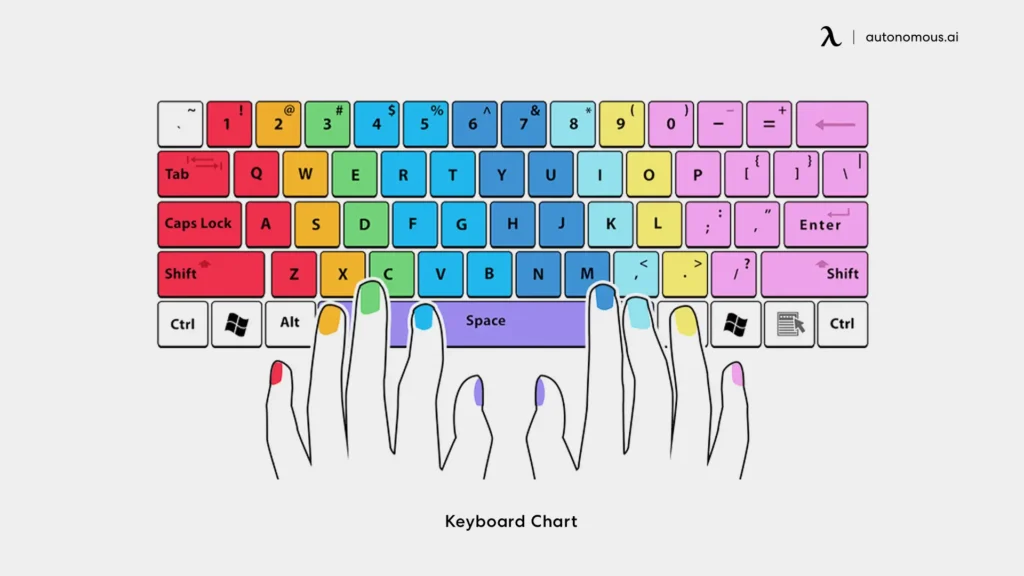
Using the wrong fingers but still trying to go fast
Using the wrong fingers prevents your hands from building the right muscle memory—the more you practice, the more you reinforce the mistake.
Slow down, use the correct finger positions first. The speed will come naturally later.
Focusing too much on speed
When your accuracy isn’t stable yet but you keep pushing the pace, things get messy. Focus on typing correctly first—your hands will build muscle memory. Once the keys feel natural and accurate, then increase your speed.
Dry, school-like practice
Dry, school-like practice
How to fix it:
Practice through games—turn it into play.
Effective (free) websites for touch typing practice: TypingClub
TypingClub
→ Suitable for beginners, helps you learn correct finger placement from the start. Includes video tutorials. The interface is clean and engaging.
This is the website I recommend the most—simple and easy to practice with. The interface is quite minimal and not very flashy, but you can train completely from zero.
Keybr
→ Trains the keys you often mistype. Best used to increase speed, not ideal for absolute beginners.
Nitro Type
→ Practice by racing cars—super addictive.
Monkeytype
→ Minimalist, close to a real typing environment
Websites to test typing speed (standard WPM)
10FastFingers
→ 1-minute test, very popular
Monkeytype (Test mode)
→ Displays WPM, accuracy, and detailed error stats
TypingTest
→ Classic tests, easy to track your progress
The touch typing practice roadmap I recommend
Start by practicing each key on Touch Typing Practice OnlineOnce you feel familiar, test your speed regularly on 10FastFingers.com – Typing Test, Competitions, Practice & Typing Games. In less than two weeks, you can already be typing with all ten fingers.
After that, you can practice in more places—like playing typing games. Don’t forget to test your typing speed regularly to stay motivated.
Notes:
- Don’t look at the keyboard
- Accuracy first, speed later
- Don’t force yourself every day
- Trust your hands’ muscle memory
- Practice like playing, not like studying
Conclusion
Touch typing isn’t a skill to show off.
It’s a skill that saves you time every single day, for many years to come.
If you write a lot, study a lot, work in an office, or do content and marketing, this is an extremely worthwhile investment.
Linkachu — someone who battled weight issues for nearly 20 years and successfully experimented with a method of eating fully and nutritiously while still losing weight, without exercising.
Ready to accompany and support career orientation and development positioning for people aged 18–33..
This is my Facebook! LinkachuMC
Learn more about me at Linkachu.net


 English
  Vietnamese